








When customers sign in to a portal, they can view their own invoices. The application must check permission for every individual invoice. This also applies when AI writes the code or retrieves invoice data through a tool.
A Common Mistake with Potentially Serious Consequences
Imagine a web application where customers can retrieve their invoices. For each request, the server must verify the user’s identity and check their permission to read the requested record.
If the invoice belongs to another customer, the application must deny access. Returning the data anyway shows that object-level authorisation is missing or ineffective.
This is a classic example of an insecure direct object reference (IDOR).
I regularly encounter these flaws in security assessments and bug bounty work. They can affect REST APIs, traditional web applications, GraphQL interfaces, file downloads and internal functions.
The OWASP API Security Top 10 covers this class of vulnerability under API1:2023 – Broken Object Level Authorization (BOLA). BOLA is the broader term for missing or ineffective checks on access to individual objects.
The impact varies considerably. The ability to view another user’s shopping basket may warrant a moderate risk rating, although a basket can still contain personal information or confidential business data.
The stakes are higher when an application exposes someone else’s invoices, health information, personnel records or confidential company documents. The impact can be greater still if the application permits changes or deletions, or allows users to trigger business processes.
The severity depends on the data involved, the actions available and the practical consequences.
Authentication and Authorisation
Authentication (AuthN) answers the question Who are you?
Authorisation (AuthZ) answers the question What are you allowed to do?
Imagine that I visit a company’s office and show identification at reception. The company now knows who I am. I still need permission to enter particular offices, access personnel files or open the server room. That permission might be enforced with an access card, a key or approval for specific areas.
The same principle applies to software. Users authenticate with a password, a passkey or another sign-in method. The application then keeps track of their identity through a session, a session cookie or a token.
Whenever someone requests an action, the application must then decide whether they may perform it on the specific resource. A role alone is often too broad. A user with the CUSTOMER role may read invoices belonging to their own account. The application still has to check which account owns the requested invoice.
The decision depends on the identity, permission, action and specific object.

How an IDOR Flaw Can Arise in Spring Boot
Consider a simple Java application built with Spring Boot.
A controller exposes an endpoint for reading an invoice. Method security is enabled with @EnableMethodSecurity. If the controller restricts the call to signed-in users with @PreAuthorize("isAuthenticated()"), Spring Security has verified that the caller has authenticated.
The check for permission to read that particular invoice is still missing.
The expression isAuthenticated() establishes that the caller is authenticated. A repository lookup by ID alone leaves ownership out of the query.
Adding @PreAuthorize("hasRole('CUSTOMER')") restricts access to users with the customer role. The application still needs a rule for deciding which invoices each customer may read.
This also matters for guest accounts. A guest using a regular authenticated account satisfies isAuthenticated(). Spring Security treats anonymous users separately.
Random UUIDs can make valid object identifiers harder to guess. They can still appear in API responses, links, logs or error messages, so every request needs the authorisation check.
Enforcing Object-Level Authorisation with Spring Security
For this simplified example, each invoice belongs to a user and a tenant. To read it, the caller must be its owner within the relevant tenant and have invoice read permission.
First, derive the actor’s security context on the server.
record Actor(
    UUID userId,
    UUID tenantId,
    boolean mayReadInvoices
) {
    static Actor from(Authentication auth) {
        Jwt jwt = (Jwt) auth.getPrincipal();

        boolean allowed = auth.getAuthorities()
                .stream()
                .anyMatch(a -> "SCOPE_invoices.read"
                        .equals(a.getAuthority()));

        return new Actor(
                UUID.fromString(jwt.getSubject()),
                UUID.fromString(
                    jwt.getClaimAsString("tenant_id")
                ),
                allowed
        );
    }
}
This code assumes a correctly configured OAuth 2.0 resource server and validated JWTs. The system must be able to trust the mapping between the user ID and the tenant. If users can switch tenants, the application must separately verify membership of the selected tenant.
Take the identity from the authenticated principal. Treat identifiers supplied in requests as untrusted input.
The repository can then scope the lookup to the tenant and owner.
public interface InvoiceRepository
        extends JpaRepository<Invoice, UUID> {

    Optional<Invoice> findByIdAndTenantIdAndOwnerId(
            UUID id,
            UUID tenantId,
            UUID ownerId
    );
}
The query returns an invoice only if it belongs to both the specified tenant and the specified user.
The service layer enforces the permission to read invoices and uses the scoped query.
@Service
public class InvoiceService {

    private final InvoiceRepository repository;

    public InvoiceService(InvoiceRepository repository) {
        this.repository = repository;
    }

    @Transactional(readOnly = true)
    public InvoiceDto read(UUID id, Actor actor) {

        if (!actor.mayReadInvoices()) {
            throw new AccessDeniedException(
                "Invoice read permission required"
            );
        }

        return repository
                .findByIdAndTenantIdAndOwnerId(
                    id,
                    actor.tenantId(),
                    actor.userId()
                )
                .map(InvoiceDto::from)
                .orElseThrow(() ->
                    new ResponseStatusException(
                        HttpStatus.NOT_FOUND
                    )
                );
    }
}
The controller passes the authenticated caller’s context to the service.
@GetMapping("/{id}")
public InvoiceDto getInvoice(
        @PathVariable UUID id,
        Authentication authentication) {

    return invoiceService.read(
        id,
        Actor.from(authentication)
    );
}
The HTTP security configuration must still restrict the API endpoint to authenticated users.
Real business applications may need further rules. Finance staff, for example, might be allowed to read other users’ invoices, while some roles may be limited to metadata. In that case, the policy needs to cover those relationships as well.
The service enforces the permission for the specific resource. Other components can use the same service and get the same decision.
Permissions Change as Applications Grow
The technical example is relatively straightforward. A growing application soon has more cases to account for.
Consider an application that starts with two roles, USER and ADMIN. Users can view and edit their own documents. Administrators can manage all documents within their remit.
A few months later, the product adds external consultants, caseworkers and team leads. Some can read documents, others can edit them, and others can approve them. Some users are also restricted to a single tenant.
The application now needs more detailed rules than the original two roles capture.
| Action | Standard user | Caseworker | Administrator |
|---|---|---|---|
| Read own document | Yes | If assigned | Yes |
| Read someone else’s document | No | If assigned | Yes |
| Edit a document | Own documents | If assigned | Yes |
| Approve a document | No | With approval permission | Yes |
| Access another tenant’s data | No | No | With explicit permission only |
This table illustrates one possible set of business rules. Developers need to understand the relationships between users, tenants, documents and actions to implement the rules for their own application. Role names alone provide limited information.
The same rules apply to exports, background jobs, batch operations and bulk downloads. Securing the main GET endpoint covers one path. PUT, PATCH, DELETE and business actions such as approve can each require different permissions.
A single missed check can undermine the permission model. I therefore look for gaps in the business authorisation logic whenever I review an IDOR or BOLA finding.
What AI Changes in Software Development
AI coding tools can produce useful Java code. Given a suitable model and a precise brief, they can quickly generate controllers, services, repositories and tests. This can save time on repetitive work.
Model settings can affect how reproducibly a coding tool produces its output. For security, the central question is whether the code implements the right business rules. Even code generated reproducibly can be incomplete or wrong. A model might add a security annotation that checks only authentication, or reuse a method whose access checks are already inadequate.
A request to build an invoice API leaves many decisions open. For example, the model may need to know if a delegated user can read an invoice or if a tenant administrator may see another tenant’s records. Even a detailed brief leaves the implementation to be verified.
How an MVP Can Create Problems Later
A minimum viable product (MVP) delivers the essentials needed to test a product idea. Early in a project, the full role and permission model may still be taking shape.
Suppose a company uses AI to build the first version of an application. The product serves one tenant and has only a few roles. The team tests the core features and releases it.
More customers arrive a few months later. The application now needs tenant isolation, more granular roles and additional approval workflows. The team asks AI to implement those features.
Will it review all the existing methods and update older repository queries? Will it spot that an endpoint written for a single tenant now needs a tenant boundary?
Explicitly asking for that review and providing the new permission model improves the chances of identifying affected code. I would make that review part of the work whenever the permission model changes.
For me, the interaction between new requirements and existing code is one of the hardest parts of using AI in software development. In an established application, the dependencies can span many classes, services and database queries. The faster new code arrives, the more code the team must understand and review against its security requirements.
Spring AI Adds Another Access Path
AI can also run inside the application itself. Frameworks such as Spring AI let language models request calls to server-side tools that interact with business processes.
An invoice assistant could use a tool to read an invoice. The model supplies an invoice ID as a tool argument. If the tool only looks up the ID, it has the same missing object-level permission check as the REST API.
The tool description and system prompt can guide the model. The application must enforce permissions using trusted identity data.
Enforcing Permissions in Spring AI Tools
Spring AI’s ToolContext lets the application provide server-side information to tools outside the model-controlled arguments. The authenticated user context can be passed to the tool this way.
The tool can reuse the invoice service.
@Component
public class InvoiceTools {

    private final InvoiceService invoiceService;

    public InvoiceTools(InvoiceService invoiceService) {
        this.invoiceService = invoiceService;
    }

    @Tool(description = "Read an authorized invoice")
    public InvoiceDto readInvoice(
            String invoiceId,
            ToolContext context) {

        Actor actor = (Actor) context
                .getContext()
                .get("actor");

        if (actor == null) {
            throw new AccessDeniedException(
                "Missing security context"
            );
        }

        return invoiceService.read(
                UUID.fromString(invoiceId),
                actor
        );
    }
}
The application sets this context on the server when it handles the chat request.
@PostMapping("/api/assistant")
public String ask(
        @RequestBody AskRequest request,
        Authentication authentication) {

    Actor actor = Actor.from(authentication);

    return chatClient.prompt()
            .user(request.message())
            .tools(invoiceTools)
            .toolContext(Map.of("actor", actor))
            .call()
            .content();
}
AskRequest is a request DTO with a message field. The chat endpoint also requires an authenticated caller with a validated JWT. The example simplifies the surrounding controller dependencies and HTTP security configuration.
The application derives the Actor from the validated server-side identity. Chat messages and model-generated arguments are untrusted input.
The same InvoiceService checks permission to access the specific invoice for both the REST API and the AI assistant.
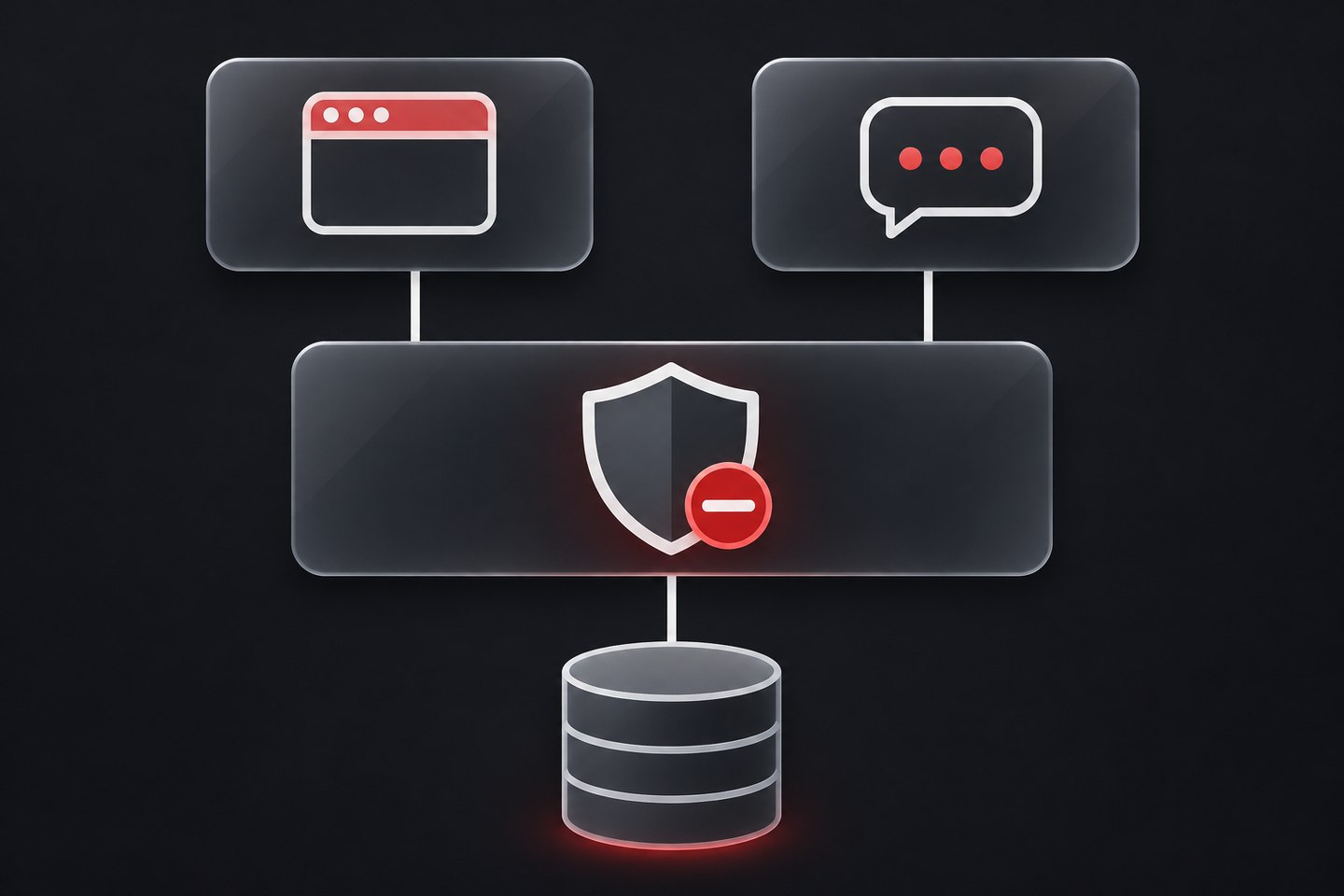
This keeps the decision in application code. The check still applies if the model chooses the wrong invoice, the user requests an action they lack permission to perform, or a prompt injection alters the assistant’s behaviour.
That protection depends on using authorised service methods consistently across every access path.
Tools that modify or approve invoices need separate permission checks for each action. Depending on the consequences, the application may also require explicit user confirmation. Keep tool results to the data needed for the task, since those results are typically passed back to the model.
How I Would Use AI in Security Reviews
AI can help review code as well as write it. An agent can identify controller methods, trace calls to services, and flag places where it cannot see an object-level check.
In my experience, specialised agents can help when given a specific task. I would ask an agent to map access to the relevant business objects and compare the checks it finds with the documented policy for each role, tenant and action.
This depends on defining those rules first. An agent can flag inconsistencies and surface assumptions. The team still needs to say which relationships and exceptions the business permits.
Combining Automated Checks with Manual Review
Start by documenting the permission model. Specify which users, roles and service accounts can perform each action, which resources they may access, where tenant boundaries apply, and which exceptions are intentional.
That provides a basis for automated tests. For the invoice example, I would include cases such as these.
| Test scenario | Expected result |
|---|---|
| User A reads their own invoice | Access allowed |
| User A requests User B’s invoice | Access denied |
| User A requests an invoice from another tenant | Access denied |
| A user without read permission requests their own invoice | Access denied |
| A user with read permission attempts a change without write permission | Change denied |
| A Spring AI tool requests an invoice outside the caller’s permissions | Access denied |
At the example REST endpoint, a caller without invoice read permission receives 403 Forbidden. If the invoice is absent from the permitted set of records, the endpoint returns 404 Not Found. For the AI assistant, the tool’s error handling determines how a denied request is presented.
Alongside service-level tests, run integration tests with different authenticated identities and real test records. This checks whether tenant isolation holds through the whole request path.
Manual code review remains important. In a large codebase, especially one with substantial AI-generated code, I prioritise review depth by risk. Processes involving personal or financial data, tenant switching, administrative access or changes to records deserve particular attention. Baseline authorisation tests still belong in the automated suite.
Vulnerability assessments can flag technical issues, while penetration tests can check how authorisation behaves across functions and workflows. Reviewing source code and testing the running application give complementary views of the same controls.
What Still Requires Human Judgement
People have built IDOR flaws into applications for years. Permission checks can be missed and requirements misunderstood regardless of who or what writes the code.
AI can help standardise implementation, reuse established security controls, generate tests and flag inconsistent checks. Its usefulness depends on the application having explicit rules about who may do what and under which conditions.
AI can also increase the volume of code a team produces. When domain review, test coverage and understanding of the architecture fail to keep pace, gaps are easier to miss.
A dedicated security agent can help, and its findings still need review. Additional agents also take time, compute resources and potentially API spend. I would use part of the development time saved for security review and quality assurance.
Conclusion
Preventing IDOR requires enforcing object-level permissions throughout the application.
Spring Security provides access-control mechanisms. Spring AI lets teams connect models to existing business processes. Developers still decide what the business permits and must verify that the application enforces those decisions.
Authentication, a validated JWT and a carefully worded system prompt each serve a purpose. The application needs an explicit permission check at the point where it can enforce the decision, backed by tests.
AI can speed up development. The resulting code still has to meet security requirements, and the team needs evidence that it does.
Further Reading
- OWASP API Security Top 10 – API1:2023 Broken Object Level Authorization
- OWASP Authorization Cheat Sheet
- OWASP Authorization Patterns Cheat Sheet
- Spring Security – Method Security
- Spring AI – Tool Calling and Tool Context
The Java examples are simplified to illustrate the security principles. A production implementation also needs to account for its authentication configuration, tenant management, error handling and business authorisation rules.